See the month you'll be debt-free.
Type in your balances once. The spreadsheet picks what to pay first, builds your month-by-month plan and shows your estimated debt-free month.
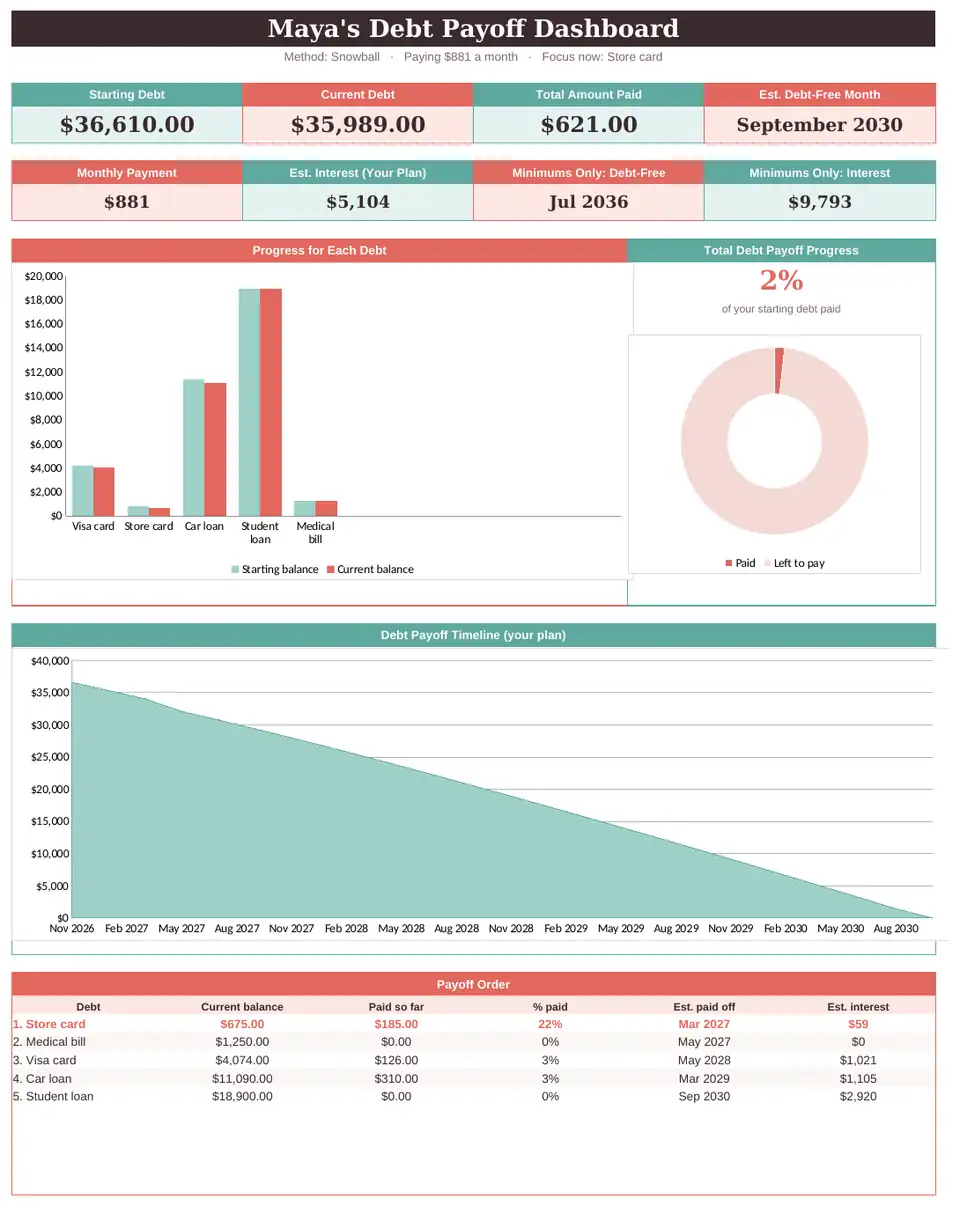
You pay every month. The balance barely moves.
That isn't a discipline problem. It's a visibility problem. When you can see the plan and the date, paying gets a lot easier to stick with.
Your payoff plan in four steps
List
Type each debt's balance, rate and minimum into the yellow cells.
Choose
Smallest balance first, highest rate first, or your own order.
Follow
The schedule tells you exactly what to pay on each debt, every month.
Watch
Log payments and see your progress charts and debt-free month update.
Everything on one screen
Starting debt, current debt, total paid and your estimated debt-free month at the top, with charts that fill in as you pay.
- Progress bar for each debt
- Total payoff progress ring
- Payoff timeline from today to your date
- The debt to focus on right now
Your debts, organized in minutes
Credit cards, car loan, student loans, medical bills: up to 30 debts. Each one shows its order, estimated payoff month and interest.
- Flags any minimum that doesn't cover the interest
- Paid so far and current balance for each debt
- Example rows show you the format

Snowball or avalanche? See both.
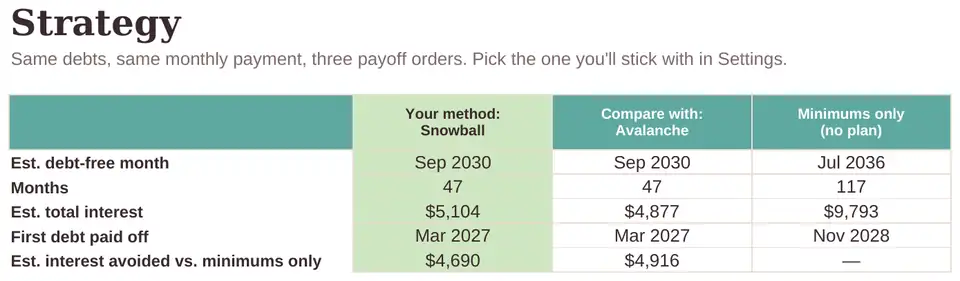
Compare the two most popular methods side by side, plus what happens if you only pay the minimums. Then pick the one you'll stick with.
- Estimated debt-free month for each method
- Estimated total interest
- When your first debt is paid off
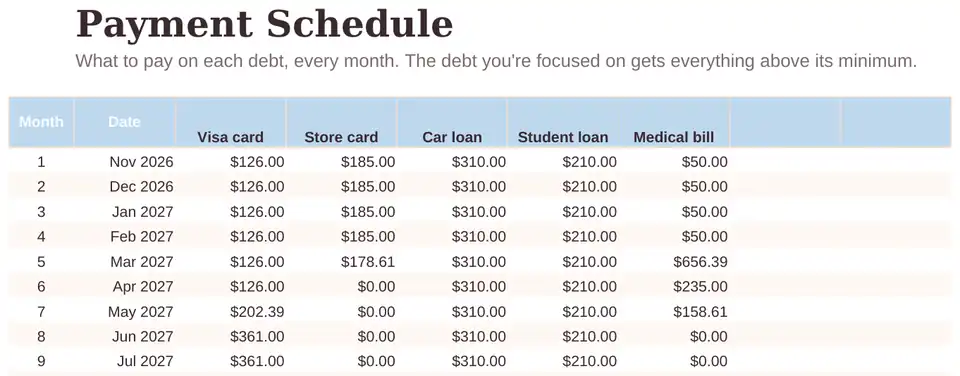
Know exactly what to pay, every month
A month-by-month plan for every debt. When one is paid off, its payment rolls into the next one automatically.
- Payment for each debt, each month
- Interest and balance left, month by month
- Extra Payments tab for refunds and bonuses
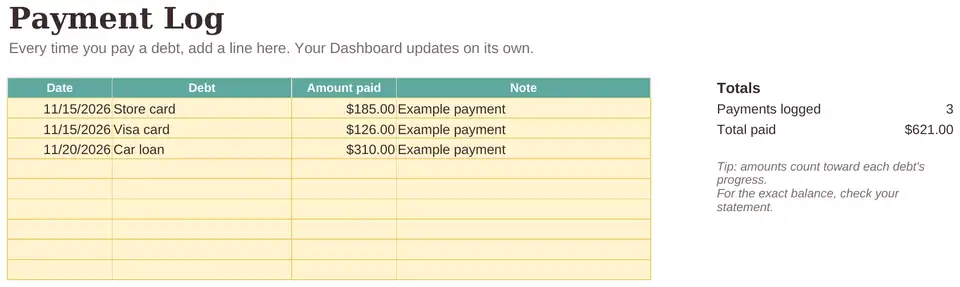
Every payment counts, and you'll see it
Add a line each time you pay. Total paid, current debt and your progress charts update on their own.
- Pick the debt from a dropdown
- Notes for each payment
- Progress you can actually see
Built for people who don't like spreadsheets
Type only in yellow
Every cell you fill in is yellow. Everything else calculates on its own, so you can't break anything.
See it filled in first
It opens with example debts, so you see how a finished plan looks before you add yours.
Video + step-by-step guide
A setup video and a Start Here tab walk you through it. Most people are set up in about 10 minutes.
A plan, not just another balance
| Debt-Free Date | Your bank app | A blank template | Budgeting apps | |
|---|---|---|---|---|
| Shows what to pay first | Yes | No | You build it | Sometimes |
| Estimated debt-free month | Yes | No | You build it | Sometimes |
| Snowball vs. avalanche comparison | Yes | No | No | Rarely |
| Connects to your bank | Never | — | No | Usually |
| Cost | $19 once | Free | Free | Monthly subscription |
Your complete debt payoff kit
- 1Debt-Free Date spreadsheetDashboard, Debt List, Strategy, Schedule, Extra Payments, Payment Log and Settings.
- 2Google Sheets and Excel versionsSame formulas in both. Use the one you already have.
- 3Setup video and Start Here guideGo from blank to a full plan in about 10 minutes.
- 4Your Sheets by Sadie libraryOpen or download anytime from your personal library, plus free updates to this version.
No subscription. Instant access after checkout.
GUARANTEE
Try it for 30 days. If it doesn't give you a clearer plan, email us and we'll refund you in full. No forms, no hard questions.
Secure checkout by Stripe · Digital download, nothing ships
Is it right for you?
Made for you if…
- You have two or more debts and want one clear plan
- You want to know what to pay first
- You'd like to see an estimated finish date
- You use Google Sheets or Excel, or are willing to try
Not the right fit if…
- You want an app that connects to your bank
- You're looking for personal financial, legal or tax advice
- You need debt consolidation or debt relief services
Questions, answered
I'm not good with spreadsheets. Will I be able to use this?
Yes. You only type in the yellow cells, it opens with example debts, and the setup video and Start Here tab walk you through each step. If you get stuck, email us.
Do I need Google Sheets, Excel, or both?
Either one. You get both versions with the same formulas. Google Sheets is free with a Google account.
Does it work on my phone?
Yes, in the Google Sheets or Excel app. We recommend doing the first setup on a computer and checking in from your phone after that.
How many debts can I track?
Up to 30: credit cards, car loans, student loans, medical bills, personal loans and more.
Is my information safe?
Your numbers stay in your own copy of the file. It never connects to your bank and we never see what you type.
Is this financial advice?
No. It's an educational planning tool that organizes the numbers you enter. Dates and totals are estimates. For personal advice, talk to a qualified professional.
What happens after I buy?
You go straight to your Sheets by Sadie library, and we email you the access link too. From there you open the Google Sheets version, download the Excel file and watch the setup video.
What if it doesn't work for me?
Email us within 30 days of purchase and we'll refund you in full.
Will it work outside the US?
Yes. The spreadsheet is in English and shows amounts in dollars, but the math works for any currency.